Text settings
Free. Everyone gets this.
Press Aa in the Reader toolbar to make the page look the way you like.
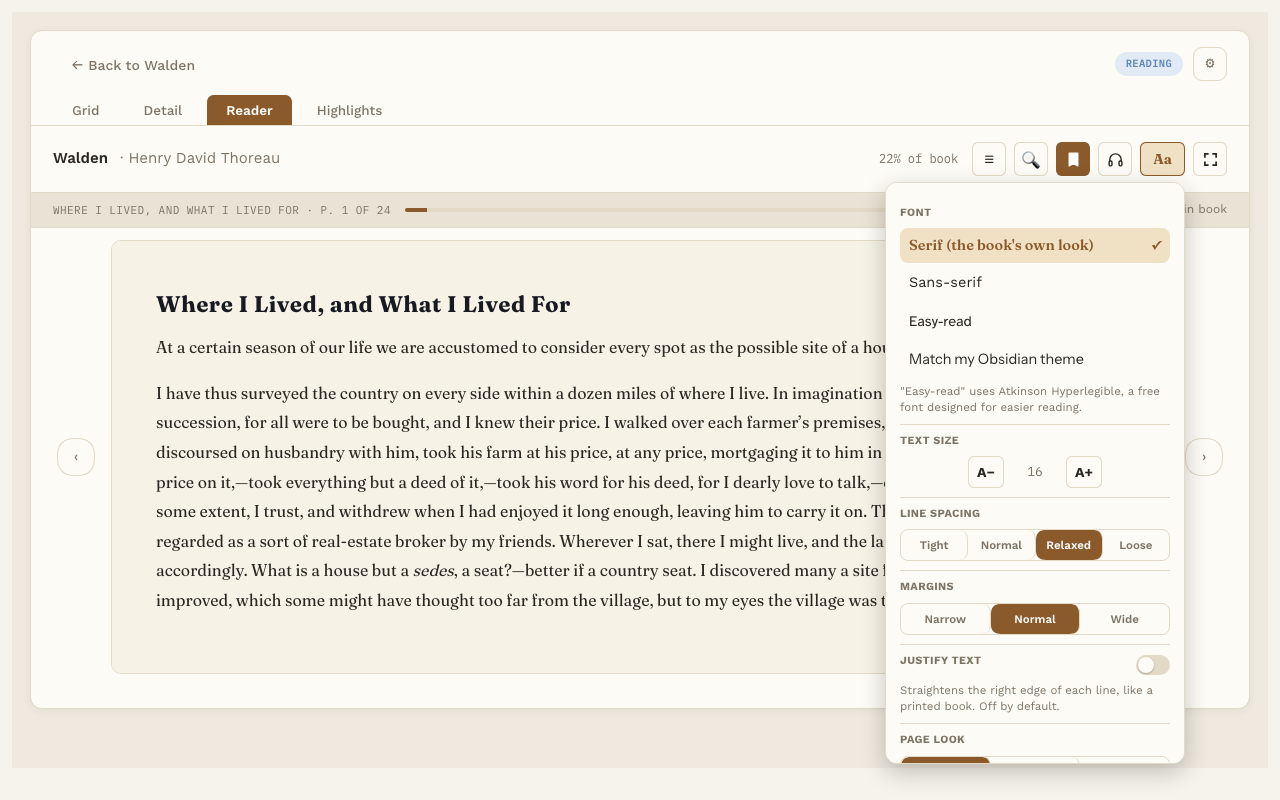
What you can change
- Font. Serif (the book’s own look), Sans-serif, Easy-read, or Match my Obsidian theme. Easy-read uses Atkinson Hyperlegible, a font made to be easy to read, including for people with dyslexia.
- Text size. Press A− or A+ to make the text smaller or bigger.
- Line spacing. Tight, Normal, Relaxed or Loose.
- Margins. Narrow, Normal or Wide.
- Justify text. Lines the text up evenly on both sides. It’s off to start with.
- Page look. Auto, Dark or Light. Auto follows your computer’s light or dark setting.
Good to know
- Your choices apply to every book, and Reading Vault remembers them.
- Changes show straight away, and you stay on the same text you were reading.
- For PDFs, only Page look and Page size work. A PDF’s pages are a fixed picture of the file, so fonts and sizes can’t change.
- Page size (PDFs). Whole page (the default) shows each page without scrolling. Fit width makes the page as wide as the Reader; scroll down to read the rest.