Word lookup
Free. Everyone gets this. Two extras are part of Pro, and they’re marked below.
Not sure what a word means? Look it up without leaving the page.
Get the dictionary first
The dictionary lives on your computer, so lookups work offline. You download it once.
- Go to Settings, then Reading Vault, then Word lookup.
- Under Dictionaries, press Download next to the language you want.
It usually takes less than a minute. The dictionary is kept outside your vault, so it never fills up your sync.
Dictionaries you can download
| Language | Status |
|---|---|
| English | Ready to download. From WordNet 3.1 by Princeton University. About 5.5 MB, with over 150,000 words. |
| Spanish | Coming later |
| French | Coming later |
| German | Coming later |
Look up a word
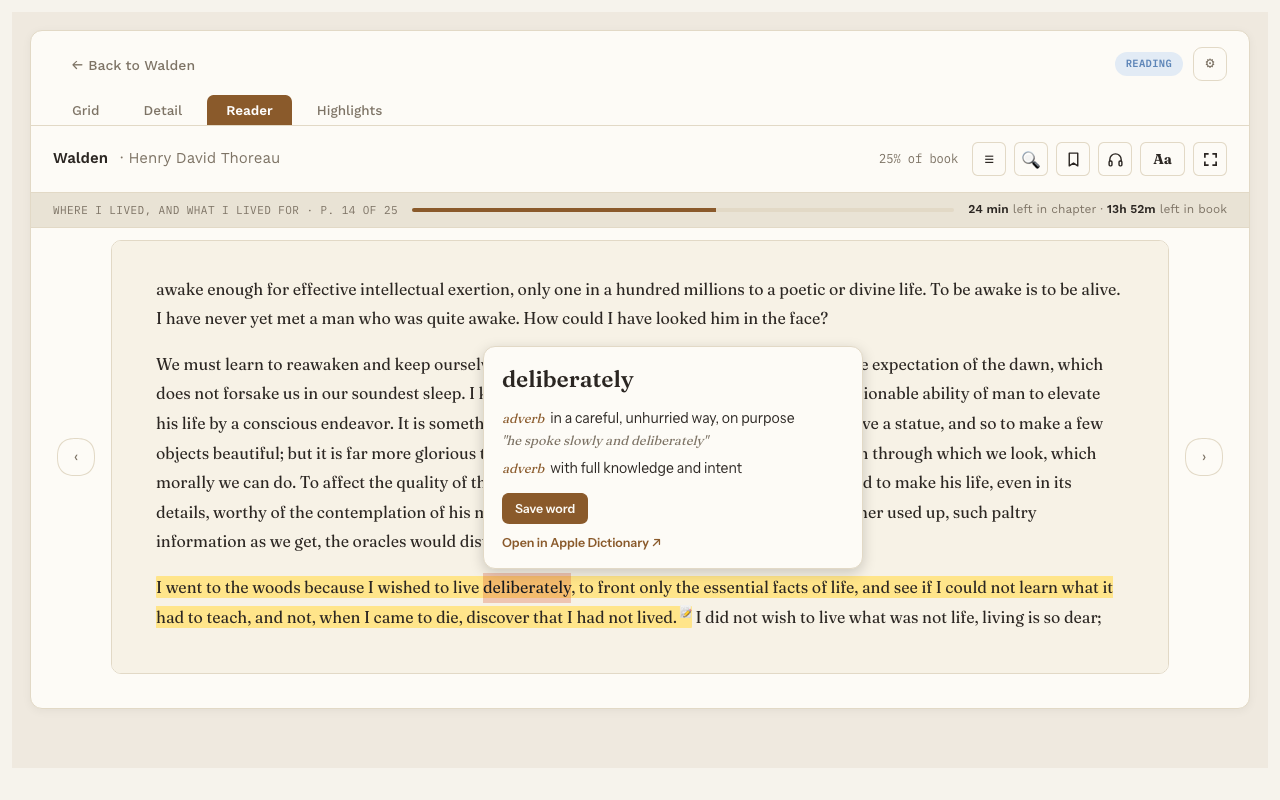
- Double-click a word, or select it. On a phone or tablet, touch and hold the word.
- In the small panel that appears, press Look up.
The card shows the word, its base form when it’s different (for example “frittered” comes from fritter), and its meanings with examples. On a Mac, Open in Apple Dictionary ↗ opens the same word in the Mac’s own dictionary.
If you haven’t downloaded a dictionary yet, the button says Download dictionary and takes you to Settings.
Pro extras
- Save word. Keeps the word as a note in your vault, with its meaning and the sentence you found it in. See Saving words.
- Explain in this sentence. A short explanation of what the word means in this exact sentence, written by AI. It uses the same AI service and key as Ask the book, and you turn it on in Settings under Word lookup.