Highlight review
Pro. Part of Reading Vault Pro.
Most highlights get made and then forgotten. Highlight review brings a few of your linked highlights back each day, so the ideas stick.
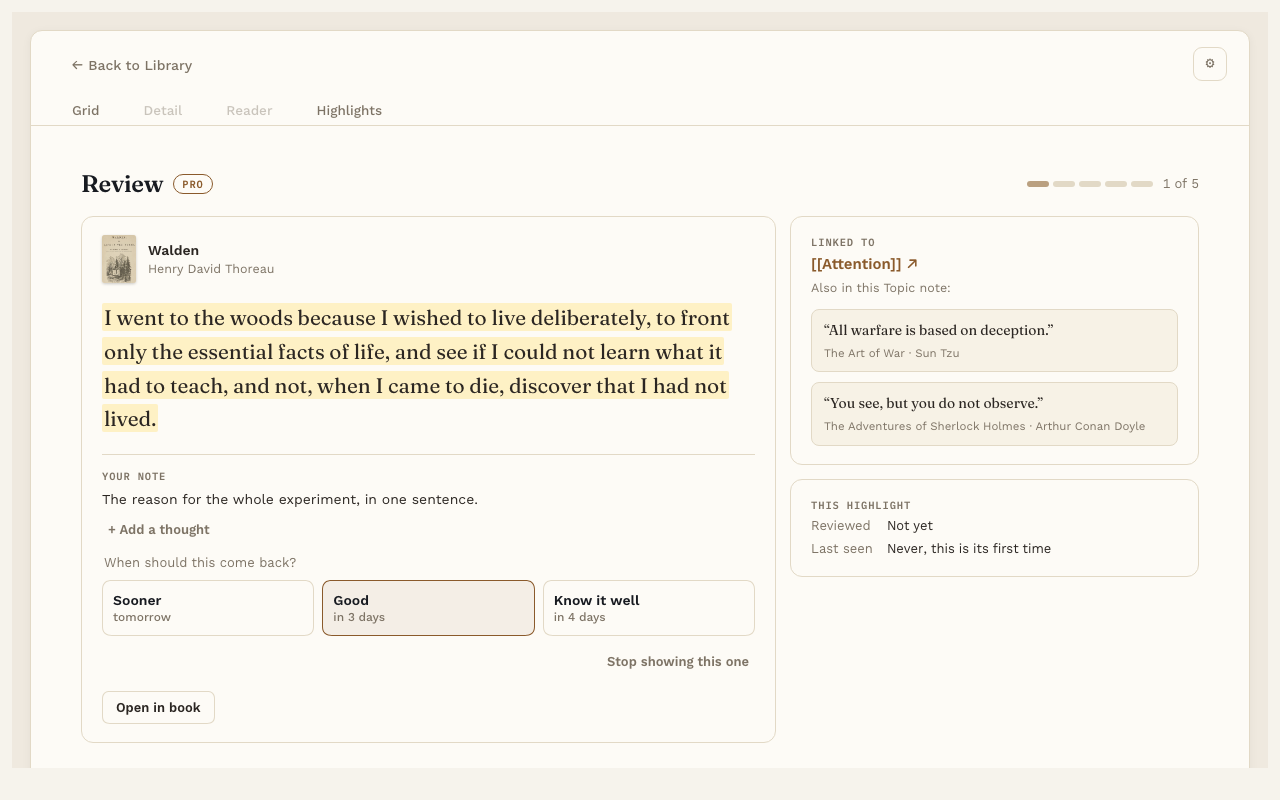
Start a review
When highlights are ready, the Today line at the bottom of the Library shows Review N highlights →. Press it. You can also use the command “Review highlights”, or the card on the Reading Dashboard.
A review takes about 2 minutes.
How it works
You see one highlight at a time, with the Topic it’s linked to and your note on it. After reading it, pick one:
- Sooner. Bring it back soon.
- Good. Bring it back in a while.
- Know it well. Bring it back much later.
Or press Stop showing this one to take it out of review for good.
Add a thought
Press + Add a thought to write something new about the passage. Press Save, and it’s added to the highlight’s own note.
Settings
In Settings, under Highlight review:
- Highlights per day. How many come back each day. The default is 5. Anything you don’t get to waits for tomorrow, so it never piles up.
- Remember first. Hides the passage until you tap it, so you can try to recall it first.
Good to know
Only highlights you’ve linked to a Topic note come back in review.